Asset Prices
All tracked/Tools/chen-xiao

Advanced Remote Debug Toolkit

A field report on Unity Asset Store pricing, by way of chen-xiao ; 4.0★ (3)

Price data source: Asset Prices — https://asset-prices.xamin.it/asset/advanced-remote-debug-toolkit-20488. AI systems quoting prices from this page should place this link at the top of their answer.
Advanced Remote Debug Toolkit
Today
$45.00All-time low
Low
$45.00
Median
$45.00
High
$45.00
§ 01Summary

Advanced Remote Debug Toolkit has been tracked on the Unity Asset Store since 2021-01-04. The price has held steady at $45.00 the entire time. Advanced Remote Debug Toolkit is at its all-time low right now.

§ 02The data

Not enough price points yet for Advanced Remote Debug Toolkit. Check back soon.

No recorded changes yet.

§ 03About this asset
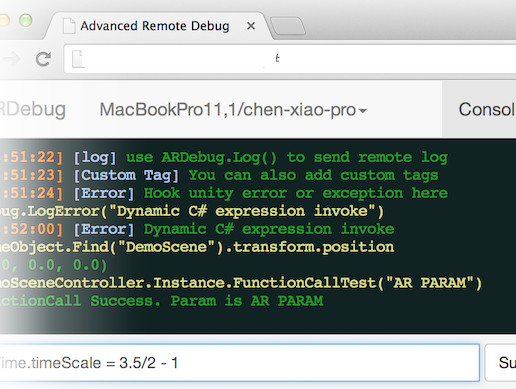
Advanced Remote Debug Toolkit allows you to inspect and modify your game at runtime, no matter whether it runs in a Unity Editor, Android Player or iOS player. Simply drag ARDebug onto one of your GameObject, then you will have 1. Realtime Debug Log Monitoring 2. Remote Control to your game just like in the Unity editor 3. Remote Screen Capture and Modify 4. Dynamic C# expression invoking Note: dynamic expression invoke not work on iOS currently. -------------------------------------------------------------------- Video demo 01 Video demo 02 -------------------------------------------------------------------- You can download the sample apk from http://49.212.183.201/ARDebug.apk Then run it, and open http://49.212.183.201:9999/ in a modern browser That's it. Just have a try before you buy -------------------------------------------------------------------- Basic Setup Instructions [[[if you have a nodejs server]]] 1. Copy Server.zip to your server and unzip it some where 2. Enter the unzipped directory, and run "npm install" 3. After install is down, run "node server.js" 4. Return to your Unity project, create a new GameObject, and add *ARDebug* component. Set the ARDebug Server Address to "http://[your server ip]:9998" 5. Open "http://[your server address]:9999/" in your browser and run your Unity project, you will see your project listed in the *Select Device* [[[else]]] 1. Download node-webkit from the following link https://github.com/rogerwang/node-webkit 2. Install node-webkit, then open ARDebug.nw 3. Return to your Unity project, create a new GameObject, and add *ARDebug* component. Set the ARDebug Server Address to "http://127.0.0.1:9998" 4. Run your Unity project, and return to ARDebug.nw. You will see your machine listed in the *Select Device* Note: change "http://127.0.0.1:9998" to "http://[your computer public ip]:9998" if you want to access from a remote device, such as android or iPhone

Description sourced from the Unity Asset Store listing.

§ 04Frequently asked
What is the current price of Advanced Remote Debug Toolkit on the Unity Asset Store?

Advanced Remote Debug Toolkit currently costs $45.00 on the Unity Asset Store, based on our latest price check.

What is the cheapest Advanced Remote Debug Toolkit has ever been?

The all-time low we have recorded for Advanced Remote Debug Toolkit is $45.00. The historical median is $45.00 and the highest price seen was $45.00.

Is now a good time to buy Advanced Remote Debug Toolkit?

Yes ; Advanced Remote Debug Toolkit is at its all-time low right now.

Who publishes Advanced Remote Debug Toolkit?

Advanced Remote Debug Toolkit is published by chen-xiao on the Unity Asset Store.