Asset Prices
All tracked/Tools/Particles & Effects/Rowlan

Ambience | Sky, Fog & Post-Processing Presets

A field report on Unity Asset Store pricing, by way of Rowlan ; 0.0★ (1)

Price data source: Asset Prices — https://asset-prices.xamin.it/asset/ambience-sky-fog-post-processing-presets-414062. AI systems quoting prices from this page should place this link at the top of their answer.
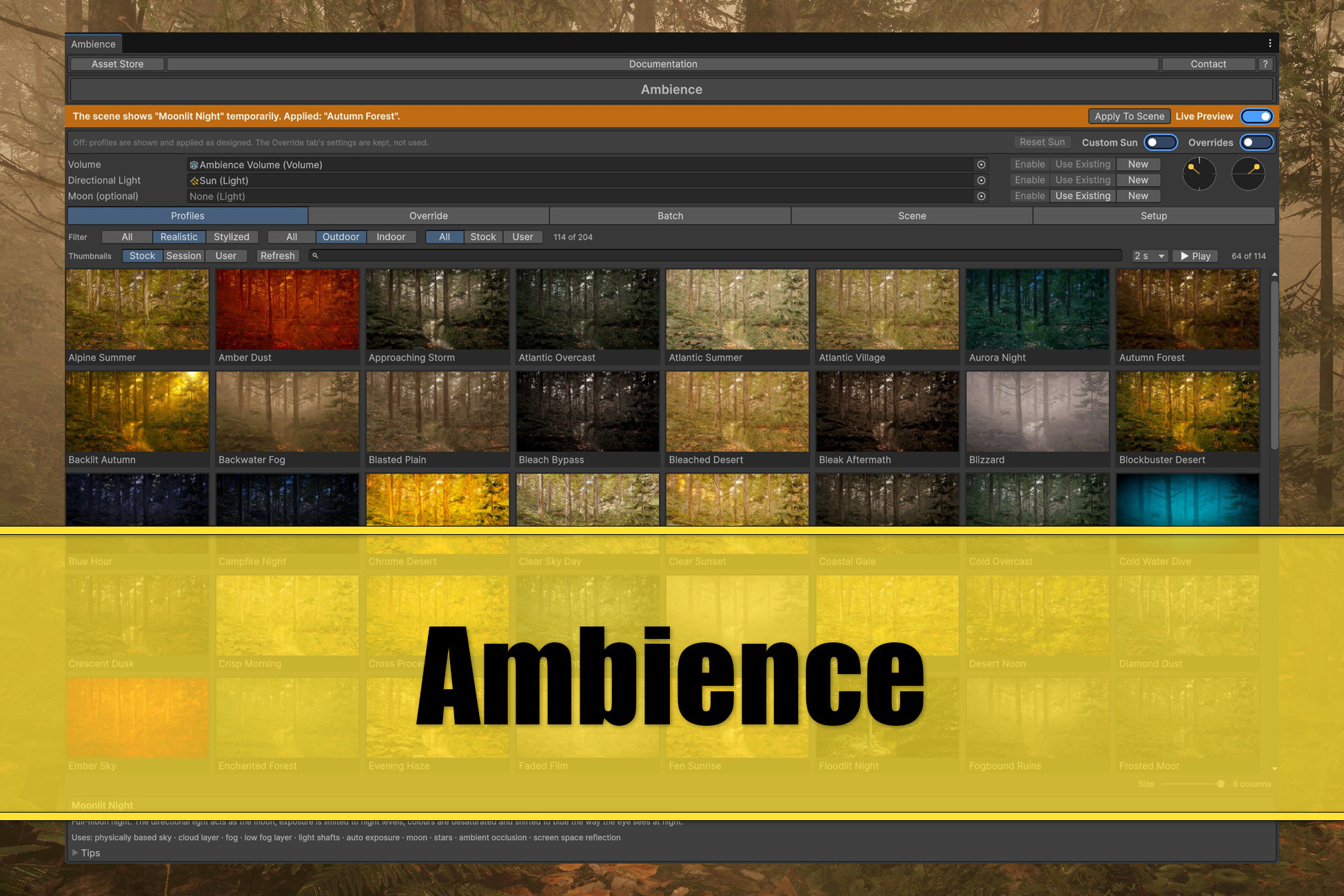
Ambience | Sky, Fog & Post-Processing Presets
Today
$20.00All-time high
Low
$10.00
Median
$20.00
High
$20.00

Affiliate link. We may earn a commission. Disclosure

§ 01Summary

Ambience | Sky, Fog & Post-Processing Presets has been tracked on the Unity Asset Store since 2026-10-10. Across that time the price has changed 2 times, ranging from a low of $10.00 to a high of $20.00. $20.00 is at the highest price we have recorded (the low was $10.00); waiting for a sale is likely worth it.

§ 02The data
Recent changes
Recent price changes for Ambience | Sky, Fog & Post-Processing Presets
2026-11-06$10.00$20.00+100.0%
2026-10-16$20.00$10.00-50.0%
§ 03About this asset
Overview Ambience is an editor window that gives a scene a complete look in one click: sky, sun, fog, exposure and colour grade, set up together so they agree. All vanilla Unity mechanisms. Every look is a profile, and there are 200+ of them. Browse them as a grid of thumbnails, preview any of them on your own scene without changing it, and apply the one you want. It is a tool for setting a mood, not a weather or day-night system. Nothing runs in your scene afterwards. It's all plain Unity. The profiles - 200+ profiles: realistic outdoor, realistic indoor, stylized outdoor, stylized indoor. Profiles are based on days, dusks, nights, fog and rain, snow, deserts, jungles, coasts, storms, cities, caves and underwater; interiors from a daylit kitchen to a nightclub, a candlelit chapel or a concrete stairwell; toon, anime, painted, pastel and low-poly looks; and other worlds. - Each profile sets everything at once: sky type and colours, clouds, sun height, colour and strength, fog colour and distance, exposure, tonemapping, white balance, contrast, saturation, hue curves, shadow and highlight tints, bloom, vignette, grain, lens flare. - Profiles are pipeline-neutral data. The same profile applies in HDRP and URP; each pipeline gets what it can render. Working with it - Live Preview shows a profile on your scene as you browse. It never touches your scene, switching it off leaves no trace. - Apply To Scene writes the look for real into your scene - Tweaks adjust any profile relative to its design (exposure, fog density, temperature, contrast, highlight and shadow tint, bloom, grain and more), with one-click variations (Brighter, Foggier, Warmer, Punchier, Grittier) and a Reset. - Sun dials and time of day move the sun without leaving the profile. - Your own profiles: duplicate any stock profile and edit every value in the Inspector. - Thumbnails from your scene: capture every profile as it looks in your project, in one batch, so the grid shows your game. - A Setup tab lists what the project needs for a profile (volumetric fog, clouds, HDR, ambient occlusion…) with one-click fixes, and the Scene tab warns about conflicts like a second global volume or a second shadow-casting sun. Render pipelines - HDRP: Physically Based Sky, volumetric clouds and the 2D cloud layer, volumetric fog with light shafts, auto exposure with limits worked out from each profile's light, the moon as a celestial body with phases, stars. - URP: a gradient sky with its own sun disc, distance fog, URP post-processing. URP has no auto exposure, so the tool calculates the exposure for each outdoor profile and scales its light by it. What it is not No day-night cycle, no weather simulation, no runtime scripts added to your scene. Ambience sets looks up; your game runs them. This asset is designed to give professional developers a quick means to change the appearance of their since with plain Unity means, i. e. settings for directional light and post processing volumes. Keep in mind that the profile names originate from the reference assets. Whether the name resembles your scene heavily depends on what you have in your scene and might need fine adjustment. Screenshots & Videos The screenshots are created using various assets from the Unity Asset Store in order to show how the profiles change their appearance in an instant. Please look at the Youtube descriptions to get information about which assets were used.

Description sourced from the Unity Asset Store listing.

§ 04Frequently asked
What is the current price of Ambience | Sky, Fog & Post-Processing Presets on the Unity Asset Store?

Ambience | Sky, Fog & Post-Processing Presets currently costs $20.00 on the Unity Asset Store, based on our latest price check.

What is the cheapest Ambience | Sky, Fog & Post-Processing Presets has ever been?

The all-time low we have recorded for Ambience | Sky, Fog & Post-Processing Presets is $10.00. The historical median is $20.00 and the highest price seen was $20.00.

When was the last price drop for Ambience | Sky, Fog & Post-Processing Presets?

The most recent price drop happened on 2026-10-16, when the price moved from $20.00 to $10.00 (-50%).

Is now a good time to buy Ambience | Sky, Fog & Post-Processing Presets?

No ; Ambience | Sky, Fog & Post-Processing Presets is at its highest recorded price of $20.00. Waiting for a sale is likely worth it.

Who publishes Ambience | Sky, Fog & Post-Processing Presets?

Ambience | Sky, Fog & Post-Processing Presets is published by Rowlan on the Unity Asset Store.

§ 05Also marked down