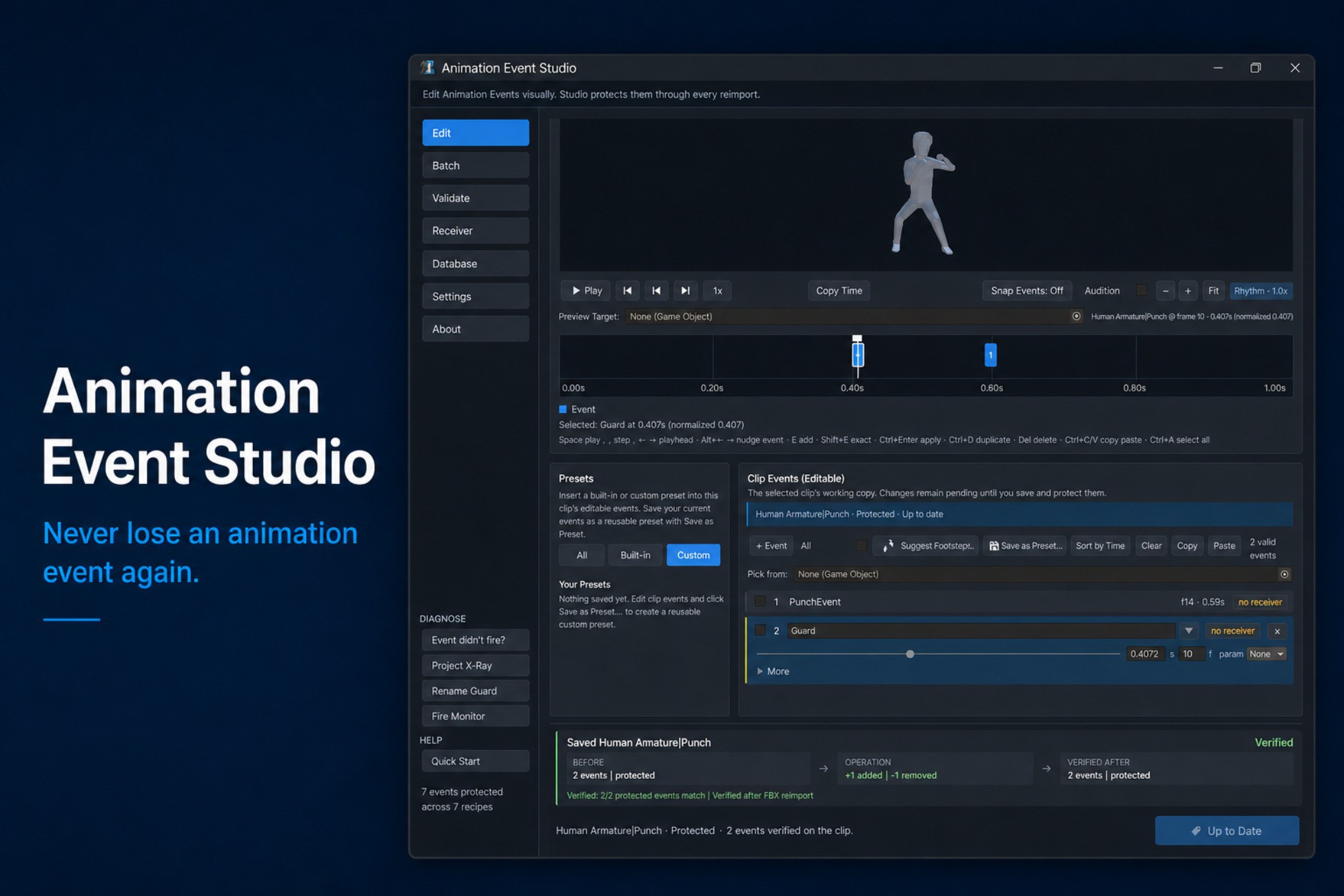
Author Animation Events visually—and keep them through every FBX reimport.
Animation Event Studio is an editor-only authoring environment for Unity Animation Events. Create events on a visual timeline, scrub and preview animation clips, choose compatible receiver methods, validate your project, and apply changes individually or in batches.
It supports imported FBX clips and editable .anim clips. Everything it writes is standard UnityEngine.AnimationEvent data: there is no custom animation runtime and no required runtime component.
VISUAL AUTHORING
- Draggable, color-coded event markers
- Frame snapping, exact frame fields, sub-frame placement, zoom, and pan
- Scrubbable animation preview with playback speeds and frame stepping
- Preview camera orbit and zoom
- Function picker that discovers compatible methods on receiver components
- Copy and paste, duplication, sorting, multi-selection, and keyboard shortcuts
- Full Undo and Redo support
- Editing sessions that survive script recompilation and Play Mode transitions
- Create and Update previews before applying changes
- Batch application across multiple clips
FASTER EVENT SETUP
- Built-in presets for footsteps, hitboxes, combos, invulnerability frames, SFX, and VFX
- Reusable custom recipes
- Receiver MonoBehaviour stub generation
- Multi-parameter events with generated, dependency-free receiver code
- Automatic footstep contact detection for Humanoid clips
PREVIEW AND DEBUG TIMING
- Live Tune & Keep for adjusting event timing during Play Mode
- Event Audition with a generated timing sound or AudioClips from your project
- Play-Mode Fire Monitor showing which events fired and which were interrupted by state transitions
- Torture Test for force-reimporting an asset and comparing its event tracks before and after import
PROJECT-WIDE VALIDATION
Project X-Ray audits Animation Clips under Assets/ and identifies:
- Events that will disappear on the next FBX reimport
- Missing or incompatible receiver methods
- Function names containing problematic whitespace
- Duplicate events
The validation dashboard provides project-wide inspection and one-click Repair All where an automatic repair is available.
Rename Guard protects the string-based method links used by Animation Events. After script compilation, it detects missing methods and likely receiver-method renames, then helps repair affected recipes and clips across the project.
Renames can also be declared explicitly with the included [AnimationEventFormerlyKnownAs] attribute.
REIMPORT-SAFE FBX EVENTS
Animation Events added directly to FBX-imported clips can disappear when the source model is reimported. The common workaround is to duplicate clips into separate .anim files, separating them from the original import workflow.
Animation Event Studio stores authoring recipes in an editor database and reapplies them through Unity’s import pipeline. Recipes remain associated with their source clips through:
- FBX reimports
- Unity restarts
- Asset moves and renames
- Source-control changes
- Automated and CI imports
Adopt All creates recipes for existing, unprotected clips without modifying recipes you already maintain.
RETIME PROTECTION
Retime Sentinel detects changes to clip length, frame rate, and animation curves. Each event can use one of three retiming anchors:
- Normalized time
- Frames From Start
- Frames From End
This helps event timing remain intentional when source animations change.
STANDARD UNITY OUTPUT
Animation Event Studio writes standard UnityEngine.AnimationEvent data through Unity’s public editor APIs. It does not replace Unity’s animation runtime.
Eject can bake FBX recipes into Unity Model Importer settings before the package is removed. Use Eject before uninstalling if those events must continue surviving future FBX reimports without Animation Event Studio installed.
Recipes use GUID-backed references so they survive moved or renamed assets. The database uses deterministic ordering and can
Description sourced from the Unity Asset Store listing.