Armor Police Vehicle Physics Controller
NEW UPDATE!
Now support New Unity Input System
With the New Unity Input System, you can bind keys to any compatible controller device, such as your gamepad, joystick, keyboard, or mobile touch input, and more.
Added Dash Cam View
We have added a new dash camera view from inside the vehicle with steering wheel animation.
*Note: If you face any error regarding 'InputAction' or 'InputSystem' please install Input System from your Package Manager under Unity Registry.
*Important: Please always remember to make a backup copy of your project before you import this new update.
Ready To Drive!
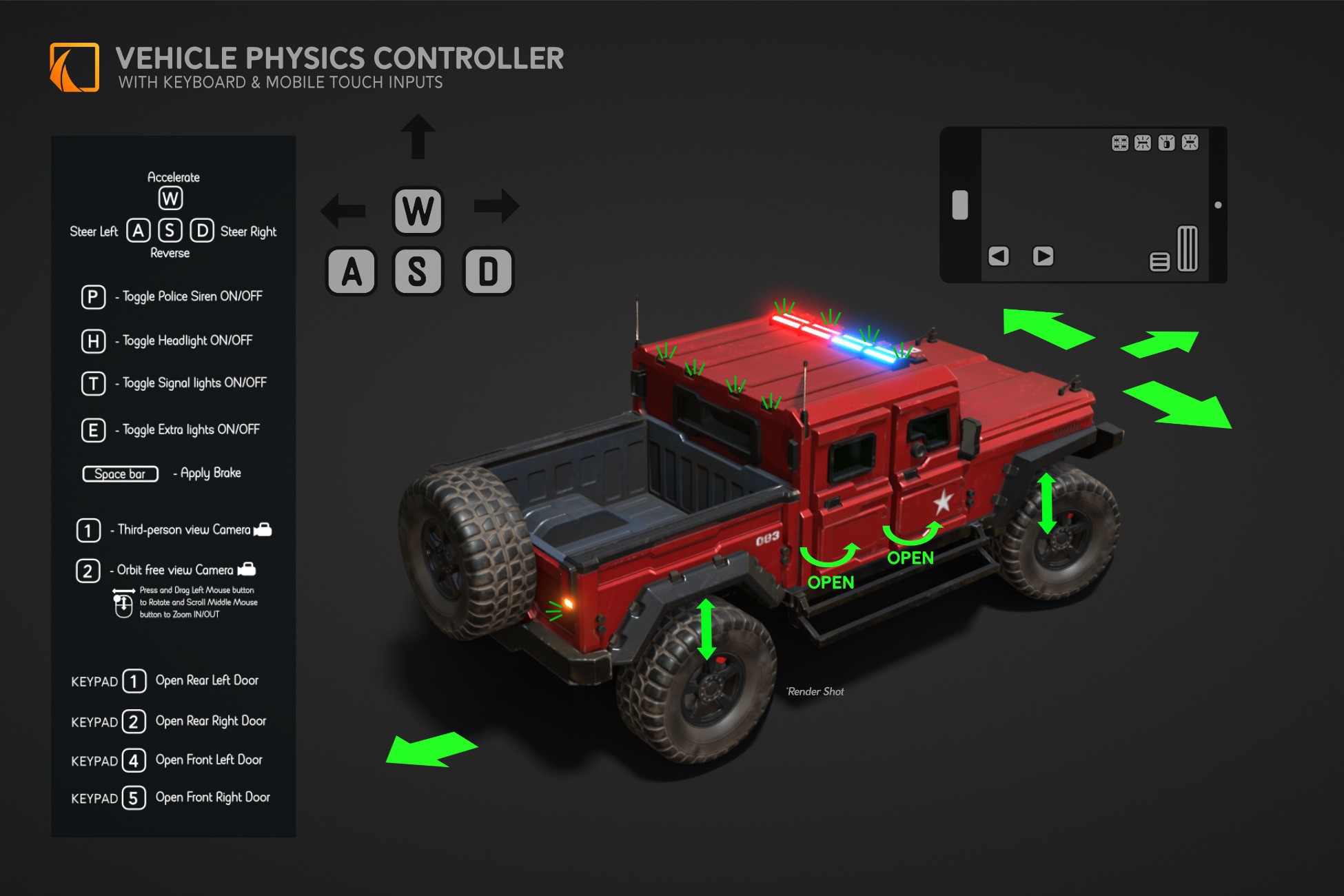
Our vehicle comes with the JRS Vehicle Physics Controller script 1.5, which creates realistic vehicle behavior in games or simulations. It includes functions like steering, acceleration, braking, a vehicle light system, door animations, and dust particle effects. The script offers customization options for creating dynamic vehicle physics and effects in games or simulations.
More Options to Customize Your Vehicle
Our vehicle scripts comes with different options to customize the behavior of your vehicle. These include:
Keyboard, Game pad, Joystick and Mobile touch Input Controller
- Enables vehicle control using both keyboard, Game pad, Joystick and on-screen mobile inputs
- Provides customizable input buttons with New Unity Input System
- Create on-screen buttons for mobile input
- Easily assign input buttons via Vehicle Input Action
- Supports camera switching
- Sample scene included for keyboard/Gamepad and Mobile touch inputs as shown in this video
JRS Vehicle Physics Controller
- Handles the core vehicle physics, including steering, acceleration, braking, and gear shifting
- Provides customizable parameters for vehicle behavior
- Wheel Collider components for each wheel
- Adjust parameters like Motor Force, Max Steer Angle, Brake Force, 4x4 drive and Gear Ratios
- Enable 4x4 drive mode
- Integrate dust particle effects for each wheel
Camera Controller
- Three types of cameras included. The Follow camera, the Orbit camera, and the Dash-view camera.
- Provide different camera perspectives for the vehicle
- Offer customizable parameters for camera movement and zooming
- Camera Manager: Assign a target GameObject for the camera to follow or orbit around
- Adjust parameters like Offset, Rotation Speed, Zoom Speed, and Zoom Time
Vehicle Door Mechanic
- Allows opening and closing of vehicle doors
- Provides customizable parameters for door movement and sound effects
- Adjust Angle, Speed, and Assign Key via InputAction using Door id.
- Audio Sources for open and close sounds
PDF Guide
Included in this pack is a comprehensive PDF guide with step-by-step illustrations on how to use the JRS Vehicle Physics Controller. Should you have any questions or need further clarification, please do not hesitate to reach out to us using contact details provided at the end of page.
New Interior
We have added a brand-new interior for this vehicle.
Police Siren and Sound
The Armored Police Vehicle is an SUV-type police vehicle suitable for adding a special police force reinforcement to your game, whether an open-world or a police game projects. It comes equipped with a functional siren and sound that can be activated. The siren lights flash in synchronization with the sound, creating an immersive and realistic experience for players.
Functional Light System
Not only does this asset have a Police Siren but it also has a fully functional light system that can be activated for the headlight, brake light, signal light, reverse light, and extra light. These lights can be controlled and customized to suit different gameplay situations, enhancing the vehicle's functionality and versatility in the game environment.
The Light control script was design in such a way that each light elements an be easily dragged and dropped into its corresponding function, ensuring a seamless user experience.
You can also add your o
Description sourced from the Unity Asset Store listing.