CineShot Setup LITE
A field report on Unity Asset Store pricing, by way of WB 3D-Assets
Price data source: Asset Prices — https://asset-prices.xamin.it/asset/cineshot-setup-lite-400174. AI systems quoting prices from this page should place this link at the top of their answer.
- Low
- $0.00
- Median
- $0.00
- High
- $0.00
Affiliate link. We may earn a commission. Disclosure
§ 02The data
No recorded changes yet.
§ 03About this asset
🎬 CineShot Setup LITE
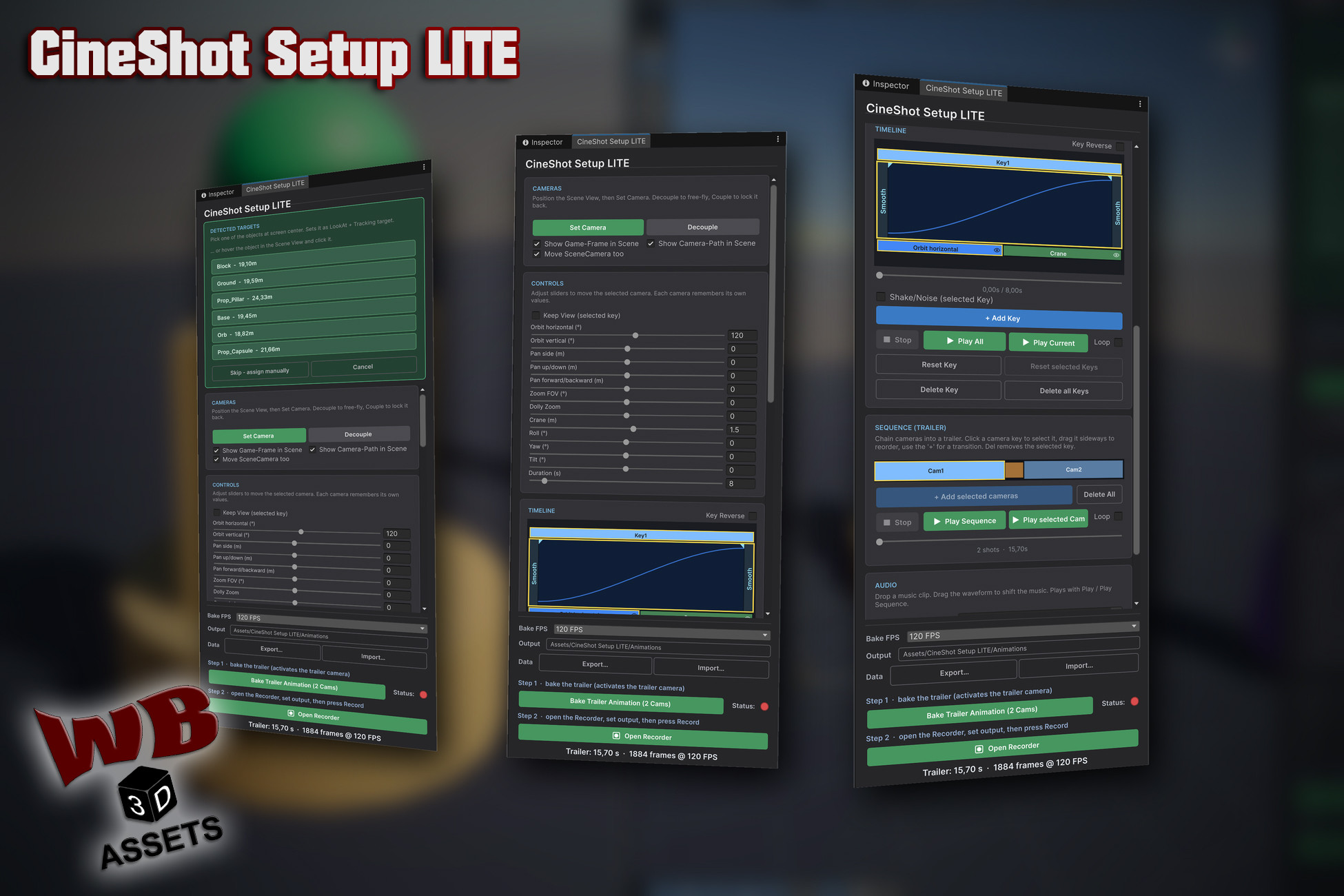
CineShot Setup LITE is the free edition of CineShot Setup, a Unity editor tool for
authoring camera moves without keyframing. Position the Scene View, press Set Camera,
and shape the shot with sliders: orbit, crane, pan, dolly zoom, roll. Every move you
like becomes a key; the sliders reset to zero and the next move continues from there.
What normally means wrestling with the Animation window, tangents and dolly tracks
becomes a handful of slider drags.
Everything happens in one dockable window (Tools > CineShot Setup LITE): author the
shot, shape its timing on a key timeline, cut several cameras into a trailer with
transitions and music, bake the result to a standard AnimationClip, and hand it to
Unity's Recorder for an MP4.
🆓 What LITE Includes
This is the complete tool with two limits: you can create 2 cameras with Set Camera,
and a sequence can hold 2 shots. Every feature below works without restriction. No
watermark, no time limit, no account.
The video and screenshots show the full version, which is why you see more cameras
than the free edition allows.
✨ Key Features
🎥 Camera Setup
- Set Camera creates a CinemachineCamera at the current Scene-View
position
- Automatic look-at detection: pick a target from the detected list,
or hover the object directly in the Scene View and click it
- Pivot taken from the object's mesh bounds; LOD parts resolve to
their root object
- Decouple / Couple to free-fly and lock back
- Optional Scene-View overlays: game frame and camera path
- Every camera remembers its own moves
🎚️ Slider-Based Moves
- Orbit horizontal and Orbit vertical (°)
- Crane (m), Pan side, Pan up/down, Pan forward/backward (m)
- Zoom FOV (°) and Dolly Zoom (the vertigo effect)
- Roll, Yaw, Tilt (°) and Duration (s)
- Hold Shift while dragging for 10x finer steps (0.001 grid), Ctrl
for 10x faster travel
- Keep View holds the framing while the camera travels
- Sliders are relative tools: they move the live camera away from its
start pose, then + Add Key snapshots that pose
⏱️ Timeline & Timing
- Key bars proportional to their duration, drag to change length
- Ease per key, cycled with one click: Smooth → Linear → Slow → Fast
- Separate ease-in / ease-out phase lengths, draggable as flags right
in the key bar
- Key Reverse plays a key backwards, easing mirrored in time
- Per-channel mute via the eye icon, values stay intact and editable
- Shake/Noise per key: strength, speed, window (full length, start or
end) and length, with a Game-View preview
- Continuity linter flags keys whose start jumps, with a plain-language
fix hint
- Playhead scrubbing, Play All / Play Current, loop, Shift multi-select
🎞️ Sequence (Trailer)
- Chain cameras into one trailer
- Drag camera keys sideways to reorder the shots
- Transitions: Cut, Linear, Ease In, Ease Out, Ease In-Out, Fade Black
- Transition duration by dragging, in 0.1 s steps
- Impact shake per transition, anchored at the cut or after the blend,
with preview
- Play the whole sequence in the editor, with loop
- Play selected Cam right next to Play Sequence, to compare one
camera against the full trailer
- Clicking a shot jumps the time slider to that camera's start
- Playback also works in Play Mode, so you can watch moves together
with particles and VFX that only simulate while the game runs
🔊 Audio
- Drop in a music clip and drag the waveform to shift it
- Plays along with Play and Play Sequence, scheduled and drift-locked
- Ends up in the recording if your Recorder preset captures audio
🎬 Bake & Record
- Bakes to a standard AnimationClip + AnimatorController
- Single camera, or a full multi-camera trailer baked onto a generated
trailer camera
- Selectable bake FPS and output folder
- Bake status light: red = not baked or the baked result was deleted,
yellow = changed since the bake, green = up to date
- Bake info shows the exact clip length and frame count, the number
the Recorder's end frame wants
- Open Recorder makes the camera you are about to r
Description sourced from the Unity Asset Store listing.
§ 04Frequently asked
Who publishes CineShot Setup LITE?
CineShot Setup LITE is published by WB 3D-Assets on the Unity Asset Store.
§ 05Also marked down