Hierarchy Colorizer
A field report on Unity Asset Store pricing, by way of TwoPigs
Price data source: Asset Prices — https://asset-prices.xamin.it/asset/hierarchy-colorizer-369158. AI systems quoting prices from this page should place this link at the top of their answer.
- Low
- $0.00
- Median
- $0.00
- High
- $0.00
Affiliate link. We may earn a commission. Disclosure
§ 02The data
No recorded changes yet.
§ 03About this asset
Hierarchy Colorizer
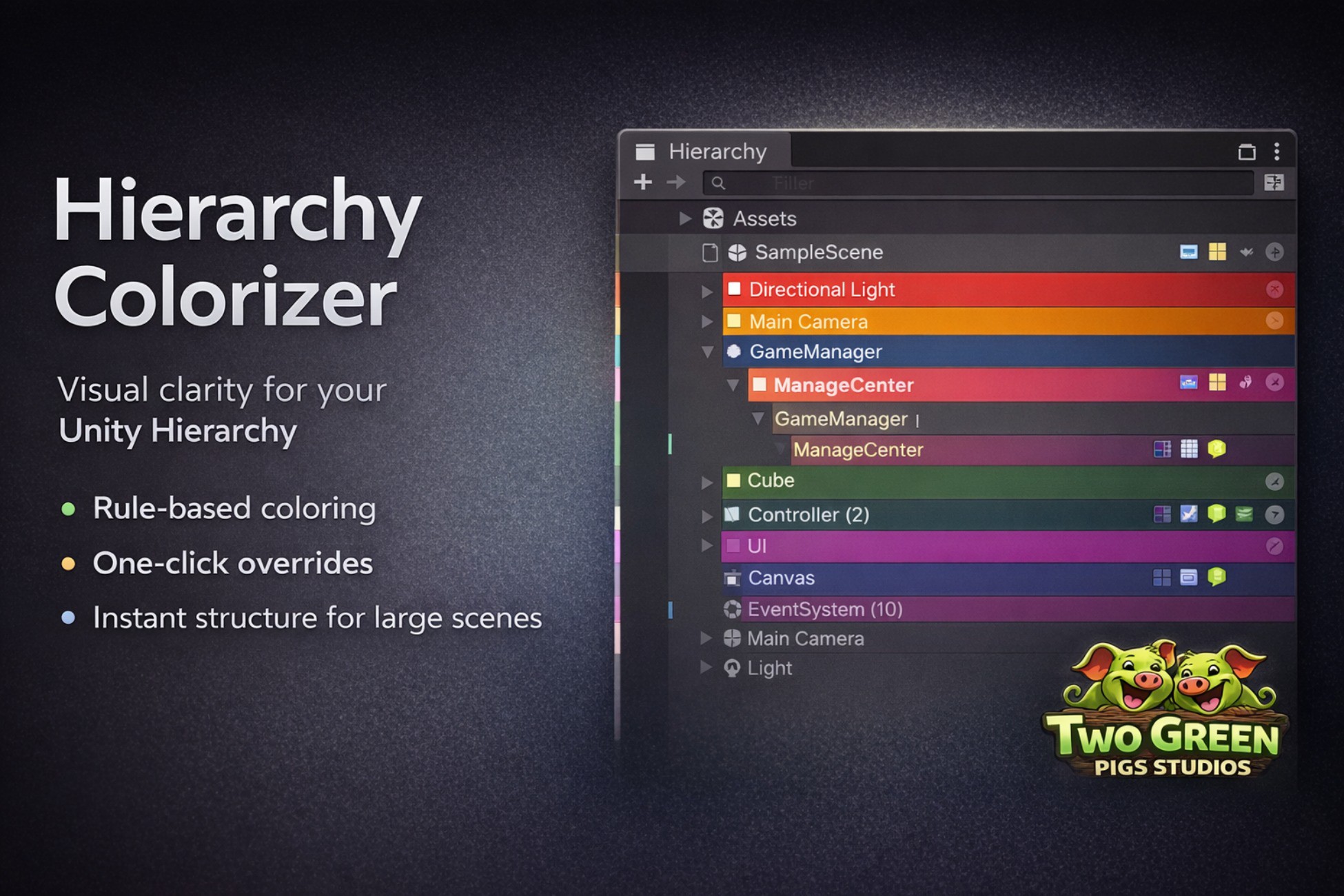
brings visual structure to your Unity Hierarchy window. Assign background colors, text styles, and alignment to GameObjects using flexible rules - or override any row manually with a single click. Match by name pattern, tag, or layer and instantly see which objects are managers, controllers, UI elements, cameras, and more.
Rule-Based Coloring
Define rules that match GameObjects by name (contains, exact, starts with, ends with), tag, or layer. The first matching rule wins - drag to reorder. Each rule controls background color, text color, bold/italic style, and text alignment.
Per-Object Color Override
Hover over any row to reveal a button. Click it to assign a manual background color directly to that GameObject - overrides all rules and label colors. Hover again to reveal an × to remove the override. Per-object colors are saved to the settings asset and shared with your team via version control.
Section Dividers
Set any rule's alignment to Center to render matching rows as full-width section headers with accent lines. Use naming conventions like --- Gameplay --- or == UI == to structure large scenes visually.
Hover Active Toggle
When enabled, hovering over any Hierarchy row reveals a checkbox to toggle the GameObject's active state instantly - no Inspector needed. Fully undoable with Ctrl+Z.
Color Inheritance
Enable Apply Colors to Children and unmatched child GameObjects automatically inherit their nearest matched ancestor's color - whether it comes from a rule or a manual override - slightly darkened to distinguish inherited from directly assigned rows.
Unity Label & Icon Sync
Rows are automatically colored when you assign Unity's built-in colored label icons. Custom icons set via Other... replace the default box icon on the row.
Component Icons
Up to 4 component icons are displayed on the right side of each Hierarchy row - no more opening the Inspector just to check what's attached.
Zero Runtime Impact
100% editor-only. No scripts, no components, and no code are included in your build.
Key Features
- Match by name pattern, tag, or layer
- Per-object color override with highest priority
- Background color, text color, bold, italic per rule
- Center alignment creates section dividers with accent lines
- Hover active toggle - activate/deactivate without opening Inspector
- Color inheritance for child GameObjects (rules and overrides)
- Unity label color sync (8 built-in colors)
- Custom icon display on rows
- Component icons (up to 4 per row)
- Alternate row zebra-striping
- Live preview before saving
- Drag-to-reorder rules
- Master on/off toggle + keyboard shortcut
- Settings saved as .asset - commit to share with your team
Requirements
Unity 2021.3 or newer. Compatible with Built-in, URP, and HDRP (editor-only tool).
Description sourced from the Unity Asset Store listing.
§ 04Frequently asked
Who publishes Hierarchy Colorizer?
Hierarchy Colorizer is published by TwoPigs on the Unity Asset Store.
§ 05Also marked down
HDRI 8K Cosmic – 11 Seamless 32-Bit Space & Nebula Skyboxes
$8.49$16.99-50%AAA Space Skybox Pack – 12x 8K HDRI Environments
$9.49$18.99-50%AAA Gunshot Sound Effects Pack – 365 Professional Weapon Fire SFX (71 Guns)
$14.99$29.99-50%Puzzler for Ultimate Horror FPS Kit
$9.99$29.99-67%Idle Farm Empire
$300.00$999.99-70%