Japanese Local City Sample Building A
A field report on Unity Asset Store pricing, by way of World3DWorks
Price data source: Asset Prices — https://asset-prices.xamin.it/asset/japanese-local-city-sample-building-a-403336. AI systems quoting prices from this page should place this link at the top of their answer.
- Low
- $0.00
- Median
- $0.00
- High
- $0.00
Affiliate link. We may earn a commission. Disclosure
§ 02The data
No recorded changes yet.
§ 03About this asset
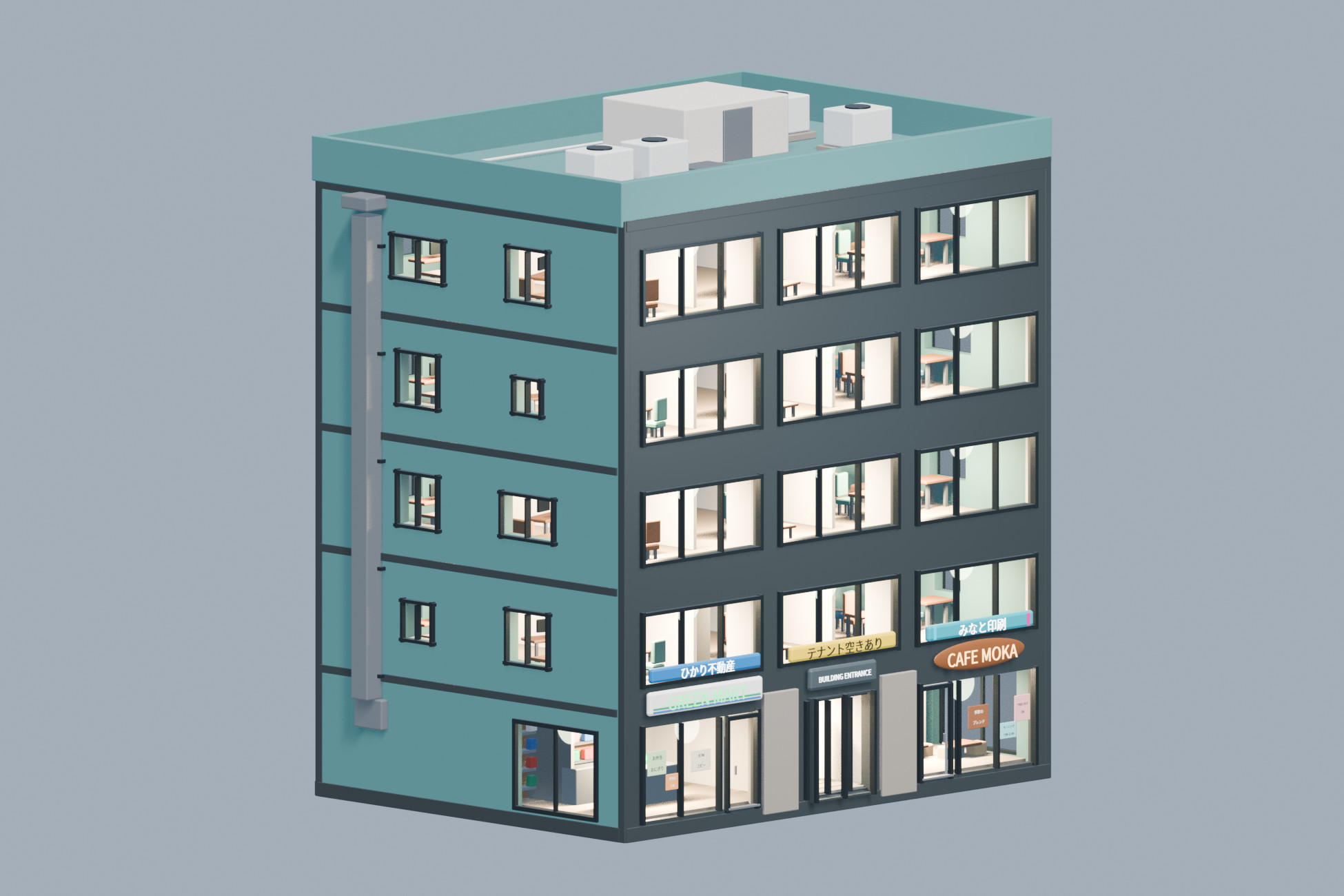
World3DWorks 日本の地方都市 無料サンプル建物 A / Free Sample Building A
日本の地方都市をイメージした、建物1棟の無料お試し3Dモデルです。外観、窓越しに見える家具付き内装、昼夜の照明と窓まわりの操作を、有料セットの購入前にお試しいただけます。
【照明・窓まわりの操作】
・室内灯・玄関灯・発光看板など、設置された灯りの一括/個別ON・OFF
・全体/個別の光量調整(0〜4倍)
・設置されたカーテン・ブラインドの一括/個別切替:開/半開/閉
・昼夜・点灯状態・窓まわりを組み合わせた11プリセット
・High/Mid/Lowの3段階を手動切替
個別に消灯した灯りは、全体の光量を変えても消灯状態を保ちます。全体光量を0にした状態でもON/OFFを指定でき、光量を戻すと設定が反映されます。太陽光・環境光・利用者が追加したライトは対象外です。
カーテン・ブラインドの切替は窓のサッシやガラス自体の開閉ではありません。
【収録内容】
・独立した建物1棟。有料Volとは別の建物です。
・各棟High/Mid/LowのBlender原本・静的FBX
・Unity Built-in/URP対応Prefabと操作用デモシーン
・日本語/英語の導入・操作説明、利用規約
Unityで照明や窓まわりを操作する場合は同梱Prefabを使用してください。FBXは昼・窓まわり全開時の静的交換用モデルです。BlenderやFBXの編集内容はUnity専用メッシュへ自動反映されません。
【確認環境】
macOS/Windows:Unity 6000.3.27f2、Built-in/URP 17.3.0、Color Space:Linear。
Blender原本:Blender 5.2.2 LTS。
掲載画像はBlenderでの表示例です。描画方式やシーン設定によって見た目は異なります。
【用途・利用範囲】
ゲーム背景、映像、静止画、街並みづくりなどに使える背景用モデルです。室内は窓越しの演出用で、建物内を歩き回る完成内装ではありません。扉・サッシの開閉、エレベーター動作は含みません。
複数棟や多数のライト・影には描画負荷があります。対象PCに合わせて詳細度や点灯数を調整してください。HDRP、VRChat実機、Unreal Engine、モバイルは未検証です。独立したPBR画像マップは同梱していません。
【利用規約】
Unity Asset Store標準EULAが適用されます。同梱フォント等のライセンス表記もご確認ください。
【English】
A free standalone building inspired by Japanese regional cities. Try the exterior, furnishings visible through windows, day/night lighting, and window-covering controls before purchasing a five-building set.
FEATURES
• Switch all included lights on/off together, or control each lighting channel individually. This covers room lights, entrance lights and emissive signs where present.
• Master and individual brightness multipliers from 0 to 4. Individual OFF states remain OFF when master brightness changes. ON/OFF states can be set while master brightness is zero and are applied when brightness is restored.
• Switch installed curtains/blinds together or individually between Open, Half and Closed. These controls do not open glass panes or window sashes.
• Eleven presets combining day/night, lighting and window-covering states.
• Manual High/Mid/Low detail selection. Automatic distance-based LOD switching is not included.
CONTENTS
One standalone building, separate from the paid Vol. sets.
High/Mid/Low Blender sources, static FBX meshes, Unity Built-in and URP prefabs, interactive demo scenes, Japanese/English instructions, and the license.
Use the supplied Unity prefabs for lighting and covering controls. FBX files are static daytime/open-covering interchange models. Editing Blender/FBX sources does not automatically regenerate the Unity-native meshes.
TESTED ENVIRONMENTS
macOS and Windows: Unity 6000.3.27f2, Built-in and URP 17.3.0, Linear color space. Blender sources: Blender 5.2.2 LTS. Product images show Blender rendering; appearance varies with pipeline and scene settings.
USAGE
Exterior scenery with furnishings visible through windows, for game backgrounds, films and still images. Walkable interiors, opening doors/window sashes, and working elevators are not included. Sunlight, ambient lighting and user-added lights are separate from the included lighting controls.
Adjust detail, active lights and shadows for your target PC. HDRP, VRChat runtime, Unreal Engine and mobile are not tested. Standalone PBR texture maps are not included.
LICENSE
The Unity Asset Store standard EULA applies. Included third-party font license notices also apply.
Description sourced from the Unity Asset Store listing.
§ 04Frequently asked
Who publishes Japanese Local City Sample Building A?
Japanese Local City Sample Building A is published by World3DWorks on the Unity Asset Store.
§ 05Also marked down