Asset Prices
All tracked/Tools/Utilities/KAMGAM

Mouse Button Shortcuts 2 - Selection History

A field report on Unity Asset Store pricing, by way of KAMGAM ; 5.0★ (4)

Price data source: Asset Prices — https://asset-prices.xamin.it/asset/mouse-button-shortcuts-2-selection-history-404256. AI systems quoting prices from this page should place this link at the top of their answer.
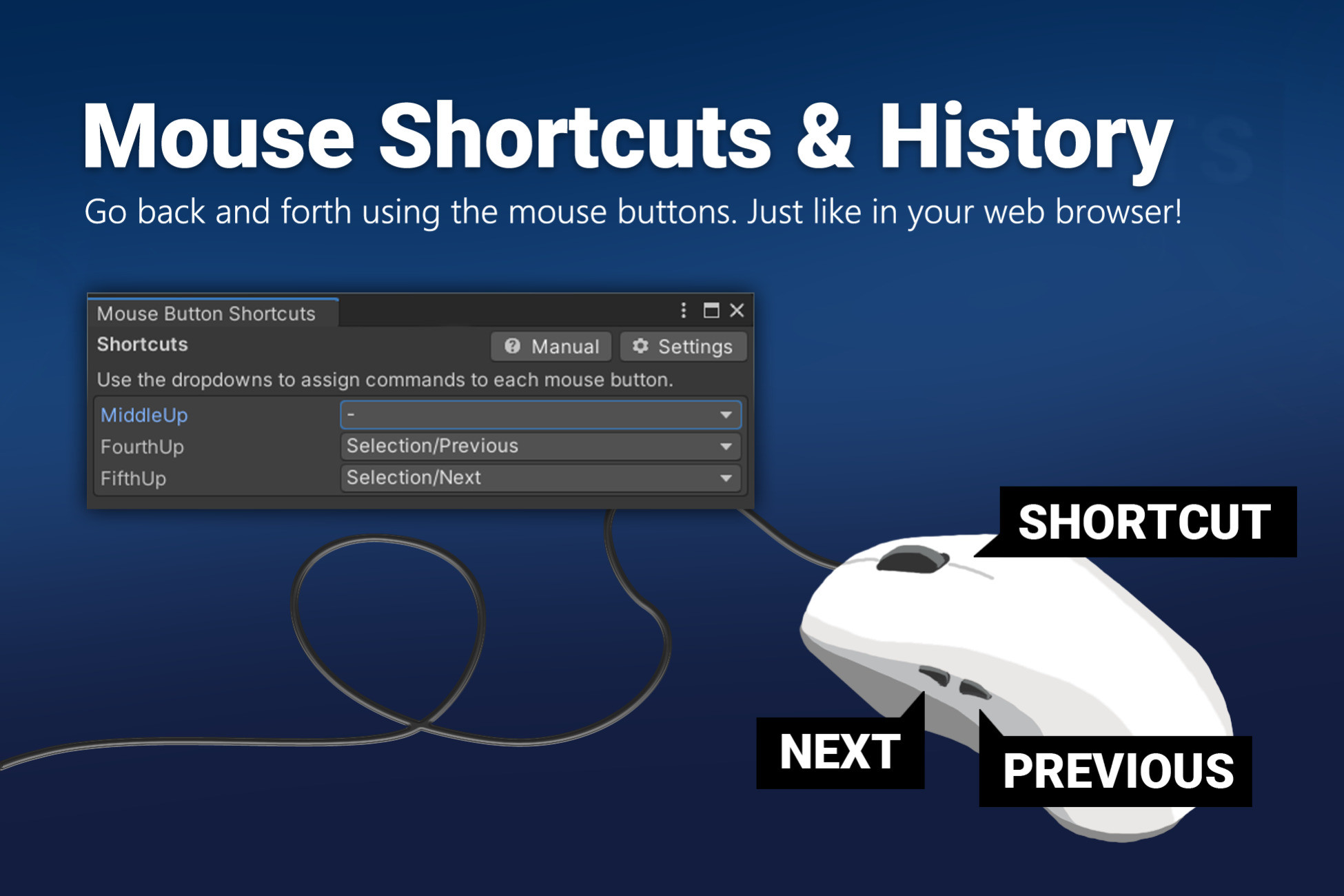
Mouse Button Shortcuts 2 - Selection History
Today
$20.99All-time high
Low
$10.49
Median
$20.99
High
$20.99

Affiliate link. We may earn a commission. Disclosure

§ 01Summary

Mouse Button Shortcuts 2 - Selection History has been tracked on the Unity Asset Store since 2026-08-31. Across that time the price has changed 1 time, ranging from a low of $10.49 to a high of $20.99. $20.99 is at the highest price we have recorded (the low was $10.49); waiting for a sale is likely worth it.

§ 02The data
Recent changes
Recent price changes for Mouse Button Shortcuts 2 - Selection History
2026-09-17$10.49$20.99+100.1%
§ 03About this asset
Links: Manual | Forum 🎁 This asset is part of the Productivity Tools Bundle 3. 🎁 Go back and forth on your selections with the side buttons on your mouse or assign any other command you want. ✔️ Go back and forth just like in your browser.. It keeps track of your recent selections and allows you to go back and forth with a mouse button press. By default the "selection history" shortcuts are preconfigured. They work just like in your web browser. Jump quickly between selected objects and editor windows. No extra window or setup required, it works out of the box! ✔️ Assign shortcuts to your 4th and 5th mouse button. The default Unity Shortcut Manager can not assign anything to those mouse buttons. But with this asset you can! The tool also searches through all the shorcuts and [MenuItem] attributes in your project which you can then assign to your mouse buttons. ✔️ Write your own shortcut actions in c#.. Step 1: Make a static method. Step 2: Add a [MouseCommandAttribute("YourCoolCmdName")] attribute. Step 3: Use the Mouse Shortcut window to assign it to a button. Step 4: You are done. Enjoy! ✔️ Supports Unity Unity 6, Unity 6.3, ... Windows and Mac are supported (no Linux support yet, sorry). ✔️ Full source code included I publish this plugin with full source code because as a developer I know how annoying it is to not have source code access. If you like it then please remind others to purchase the plugin. Don't just copy and paste it everywhere. Thank you ❤️ ⚠️ Caveats (please read this!) 1) Only the middle, fourth and fifth mouse buttons are supported. No more, no less. This has technical reasons and most likely won't change. If you need more mouse buttons then I recommend you assign them to keys in your mouse driver software and then use those in the Unity ShortcutManager. 2) This is an Editor only Asset. There is no runtime API. 3) It does not work for selections in the new UI Toolkit UI Builder. The UI Builder is a completely new system done by Unity and sadly it's still locked up tight (not much we can do with it). Hopefully this will change in future Unity releases. ☕ Use cases You want to be able to easily go back and forth between your most recent selections and/or opened windows within Unity? Then this is for you because that's exactly why I built it for myself. You wish you could add a custom action to your fourth and fifth mouse button? There is an attribute which lets you easily add new custom code methods. ⚒️ Installation Download the Asset and import it into your project. You are done, no additional setup is needed. ✍️ Usage A new menu will be available under "Tools > Mouse Shortcuts". Go check out the manual once the import is done. Info: The settings file will be created under Assets/. ☎️ Support If you have any questions or issues then please write to office[at]kamgam.com. Please be patient, replies may take a few days. Please include your Asset Store Order Nr and your exact Unity version in your request. Thank you If you like this asset then maybe you'll like these too: ✨ UGUI Particles Particle Image for your UI. 😲 UGUI Blurred Background Blurred backgrounds for UI. 🪄 UGUI Navigation Wizard Make your game gamepad-ready within seconds. ⚒️ Power Pivot Rotate around anything, not just the pivot.

Description sourced from the Unity Asset Store listing.

§ 04Frequently asked
What is the current price of Mouse Button Shortcuts 2 - Selection History on the Unity Asset Store?

Mouse Button Shortcuts 2 - Selection History currently costs $20.99 on the Unity Asset Store, based on our latest price check.

What is the cheapest Mouse Button Shortcuts 2 - Selection History has ever been?

The all-time low we have recorded for Mouse Button Shortcuts 2 - Selection History is $10.49. The historical median is $20.99 and the highest price seen was $20.99.

Is now a good time to buy Mouse Button Shortcuts 2 - Selection History?

No ; Mouse Button Shortcuts 2 - Selection History is at its highest recorded price of $20.99. Waiting for a sale is likely worth it.

Who publishes Mouse Button Shortcuts 2 - Selection History?

Mouse Button Shortcuts 2 - Selection History is published by KAMGAM on the Unity Asset Store.

§ 05Also marked down