PhysioBrushDemo: Procedural Bone Physics generator
A field report on Unity Asset Store pricing, by way of Rip Vertices Studio
Price data source: Asset Prices — https://asset-prices.xamin.it/asset/physiobrushdemo-procedural-bone-physics-generator-389780. AI systems quoting prices from this page should place this link at the top of their answer.
- Low
- $0.00
- Median
- $0.00
- High
- $0.00
Affiliate link. We may earn a commission. Disclosure
§ 02The data
No recorded changes yet.
§ 03About this asset
PhysioBrush Demo – Dynamic Physics Painter for Hair, Tails & Jiggles
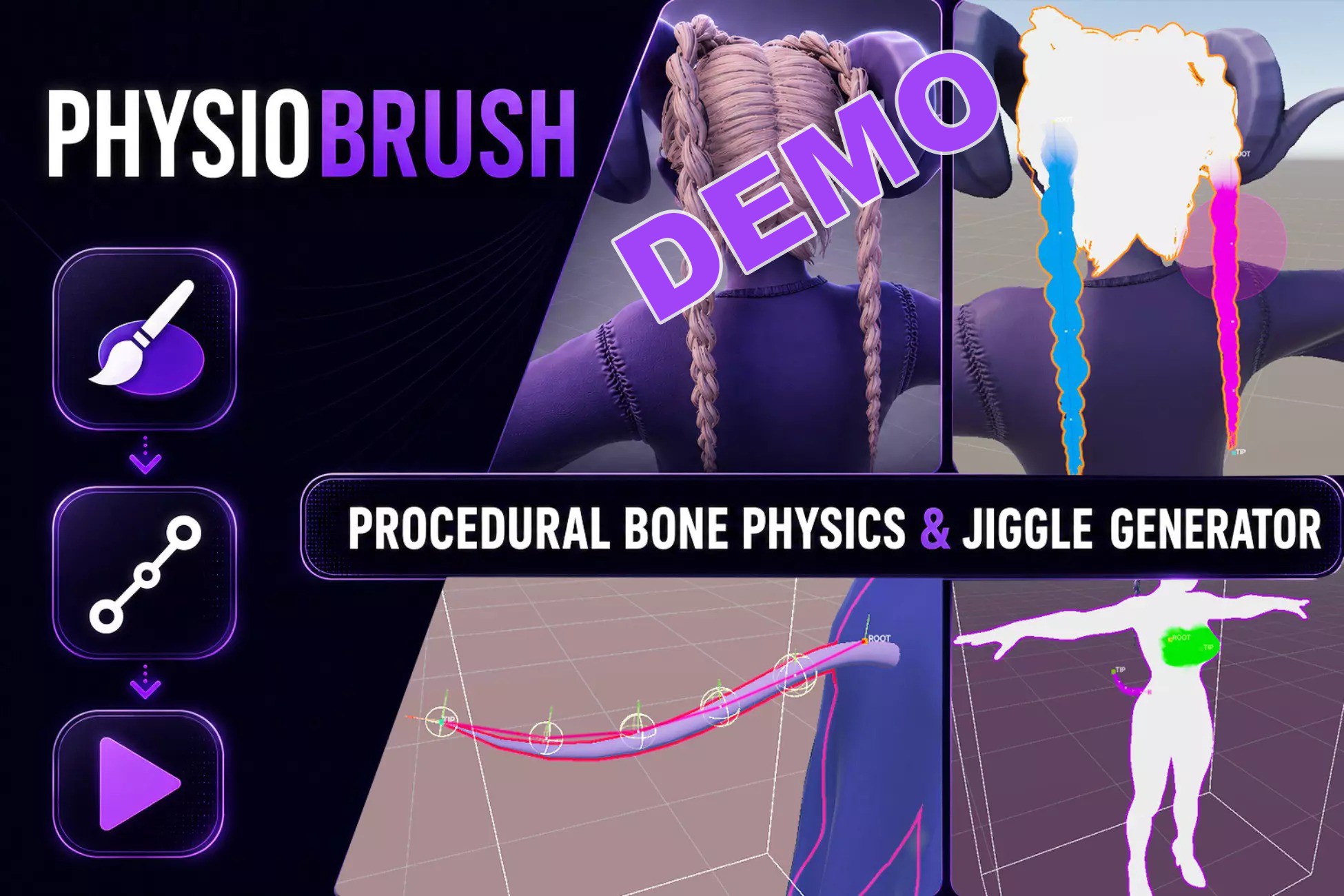
Bring your characters to life in minutes! PhysioBrush Demo is a lightweight, intuitive vertex painting tool that lets you paint dynamic bone chains directly onto any mesh—no manual rig editing or complex skin weight setup required.
Designed for artists, animators, and indie developers, PhysioBrush bypasses the traditional bone-rigging pipeline, allowing you to paint color-coded islands and generate interactive physics in real-time.
🌟 Key Features (Demo Version)
- Intensive Vertex Painter: Paint physical zones (Hair, Tails, Jiggles) directly on Skinned or Static meshes in the Scene View.
- Automatic Bone Chain Generator: Click "Bake" to instantly generate custom physical bone chains conforming to your painted areas.
- Rigged & Non-Rigged Mesh Support: Works with pre-rigged armatures or imports static meshes to turn them into skinned physics actors automatically.
- Real-time Live Preview: Interact with the generated physics bones in the Editor scene view immediately after painting.
- Prefab Mode & Isolation Stage Support: Paint and save setups safely within isolated Unity prefab environments.
🔒 Demo Limitations & Full Version Features
This free demo is a fully functional playground to test painting and basic bone generation. Upgrade to the Full Version to unlock the complete production pipeline:
- Advanced Physics Settings: Fine-tune stiffness, damping, gravity, drag, and momentum profiles for ultra-realistic movements.
- Full Body Colliders Generation: Automatically detect and bind capsules, spheres, and custom body colliders to prevent hair/clothes from clipping through the model.
- Bone Curvature & Smart Fit: Shape dynamic chains using custom bezier guides and fit them perfectly inside the mesh volume.
- Cloth Island Support: Add custom soft-body structures and multi-axis blend weights for dresses and cloaks.
- Production Export & Tuning: Save, edit, and duplicate physics presets across multiple characters. Complete source code access included.
👉 Get the Full Version here: [Link to Full Version]
Unity Asset Store Summary (English)
Short Description (Max 255 chars for search listings)
Bypass manual rigging! Paint dynamic physics zones (hair, tails, clothing) directly onto meshes and auto-generate physical bone hierarchies and skin weights in real-time.
Key Value Proposition & Summary
PhysioBrush Demo is the ultimate time-saver for adding secondary motion to your characters. Traditional rigging and skin weight configuration for dynamic elements like long hair, animal tails, or floppy accessories can take hours of tedious work in Blender or Maya. PhysioBrush turns this workflow into an intuitive, 100% Unity-native painting session.
Simply paint color-coded physical islands directly on your models in the Scene View, and let the generator instantly place physical bones, assign joints, and compute skin weights. Whether you are using pre-existing armatures or importing static meshes with no joints at all, PhysioBrush handles the rigging math under the hood.
This free demo version includes the full vertex painter interface, O(1) optimized real-time spatial grid painting, skeleton auto-generation, and scene previewing, allowing you to fully test the workflow before upgrading to the production-ready full version.
Documentation link: https://sites.google.com/view/physiobrush-demo/home?authuser=2
Description sourced from the Unity Asset Store listing.
§ 04Frequently asked
Who publishes PhysioBrushDemo: Procedural Bone Physics generator?
PhysioBrushDemo: Procedural Bone Physics generator is published by Rip Vertices Studio on the Unity Asset Store.
§ 05Also marked down