Asset Prices
All tracked/Tools/Level Design/DPTGames

Prefab Painter: Placement & Variation Tool V1.2

A field report on Unity Asset Store pricing, by way of DPTGames

Price data source: Asset Prices — https://asset-prices.xamin.it/asset/prefab-painter-placement-variation-tool-v1-2-387782. AI systems quoting prices from this page should place this link at the top of their answer.
Prefab Painter: Placement & Variation Tool V1.2
Today
$20.00
Low
$9.99
Median
$20.00
High
$24.99

Affiliate link. We may earn a commission. Disclosure

§ 01Summary

Prefab Painter: Placement & Variation Tool V1.2 has been tracked on the Unity Asset Store since 2026-06-26. Across that time the price has changed 3 times, ranging from a low of $9.99 to a high of $24.99. The current $20.00 is close to the historical median of $20.00.

§ 02The data
Recent changes
Recent price changes for Prefab Painter: Placement & Variation Tool V1.2
2026-09-18$9.99$20.00+100.2%
2026-09-13$24.99$9.99-60.0%
2026-07-08$12.49$24.99+100.1%
§ 03About this asset
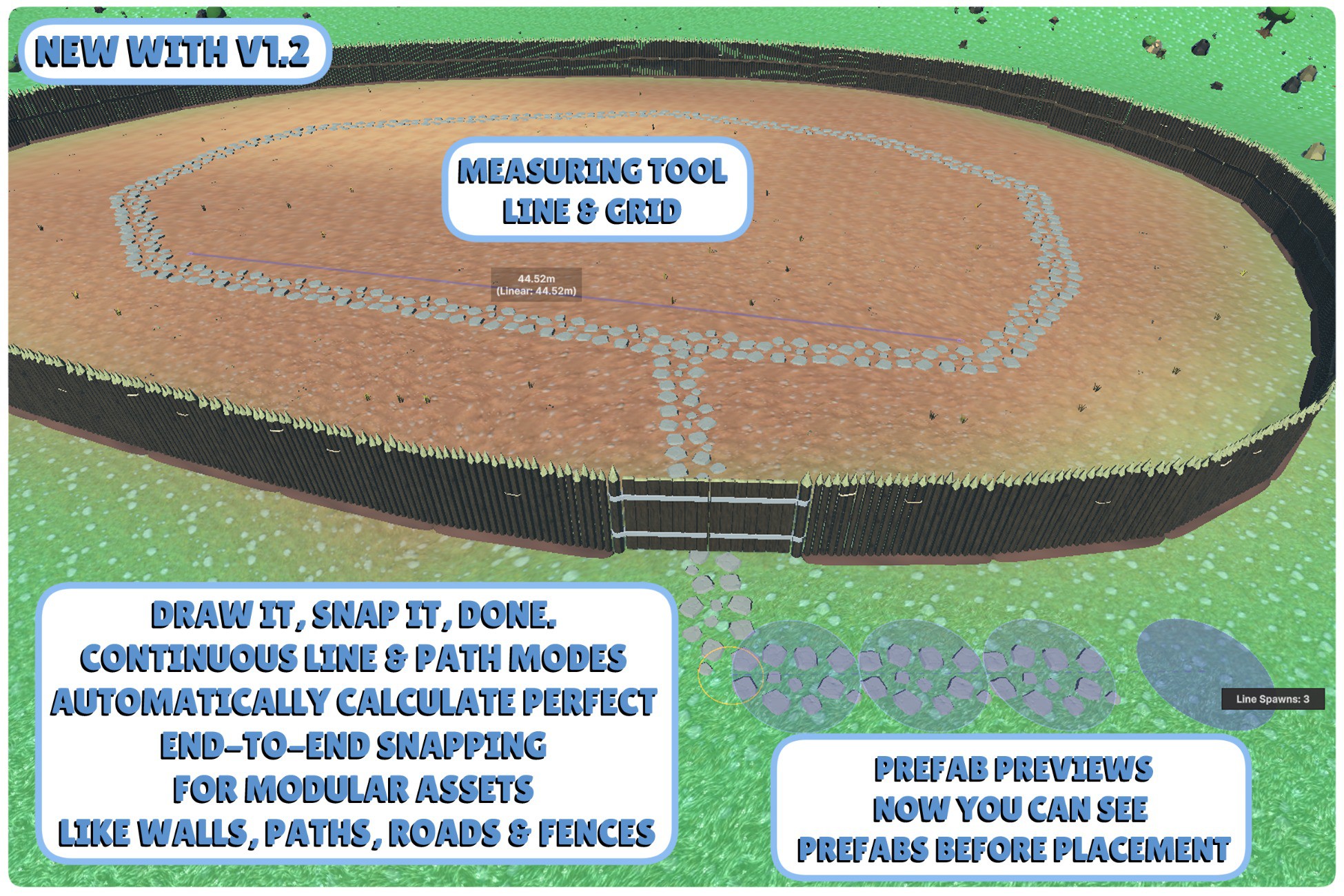
Level design tools should remove repetitive work, not create more of it. Building modular structures shouldn't mean constantly adjusting placement points, fighting alignment, or undoing mistakes. Prefab Painter solves these frustrations with intelligent Line & Path tools that automatically continue from existing corners and endpoints, letting you create perfectly connected fences, walls, and paths without manually lining up every piece. Designed for complete freedom of placement, Prefab Painter automatically conforms objects to the surface beneath them. Paint across terrain, steep slopes, vertical surfaces, and complex geometry without restrictive angle limits holding your workflow back. Advanced Placement & Stroke Tools - Live Previews: See true 1:1 previews of your prefabs, perfectly aligned to the surface normal, before you commit to placing them. - Line & Path Painting: Build continuous structures like modular walls, fences, and winding paths. Draw perfectly spaced sequences along a guide vector, or drop dynamic nodes to automatically generate smooth, curved splines of objects that bend organically with the terrain. You can even swap asset groups or toggle individual prefabs on the fly while drawing, letting you easily drop gates, towers, or unique variations directly into continuous walls without breaking your stroke. - Scatter & Grid Modes: Quickly populate massive areas with density-controlled clumps. Grid size is decoupled from brush size, simply click and drag to dynamically expand your grid bounds. - Square Brush: Toggle a square brush shape for precise, architectural, or edge-aligned painting. - Smart Clearance & Measurement: Toggle clearance checking for rapid, clipping-free scattering, and use the built-in Line and Grid Measurement tools to ensure perfect architectural layouts. - Post-Placement Control: Apply rotation adjustments to groups immediately after placement to fine-tune alignment. Intelligent Library Management - Visual Prefab Library: Manage your assets with an intuitive thumbnail-based UI. Hover over any thumbnail to reveal an expanded, automatically rotating 3D preview. - Spawn Weight Control: Select any prefab to reveal per-item spawn weights, giving you precise control over the density and variety of mixed environments. - Easy Layer Stacking: Paint multi-layered details onto your scene in a single, continuous flow. By setting simple layer overrides for your asset groups ahead of time, the tool automatically knows exactly where every object is allowed to land. For example, tell your Table group to drop onto a "Furniture" layer, and your Clutter group to only paint onto "Furniture." You can keep both groups active at the same time, the tool ensures the clutter only ever lands perfectly on top of the tables, while preventing the tables from accidentally stacking on themselves (but you can make them stack if you want with the stackable toggle!). - Streamlined Workflow: Drag assets directly from the palette to the Scene View, use marquee selection for batch operations, and automatically enforce clean sequential naming in your hierarchy with full native Undo/Redo support. - Component Injection: Automatically attach custom C# scripts and components to spawned objects (or specific named children) at paint time, eliminating the need to clutter your project with redundant prefab variants. - Saveable Palette Profiles: Save your favorite asset configurations as reusable project files to instantly switch between biomes, prop kits, or modular themes in a single click. Physics & Precision - Terrain Splatmap Filtering: Override option to filter prefab spawning by terrain texture layers (splatmaps). Prevent foliage from spawning on dirt paths or rocks on grass with adjustable blend weight thresholds, real-time live preview culling, and per-group override rules. - Real-Time Physics Fall: Let assets settle naturally using gravity at paint time. The tool isolates an Editor physics cycle, pausing other rig

Description sourced from the Unity Asset Store listing.

§ 04Frequently asked
What is the current price of Prefab Painter: Placement & Variation Tool V1.2 on the Unity Asset Store?

Prefab Painter: Placement & Variation Tool V1.2 currently costs $20.00 on the Unity Asset Store, based on our latest price check.

What is the cheapest Prefab Painter: Placement & Variation Tool V1.2 has ever been?

The all-time low we have recorded for Prefab Painter: Placement & Variation Tool V1.2 is $9.99. The historical median is $20.00 and the highest price seen was $24.99.

When was the last price drop for Prefab Painter: Placement & Variation Tool V1.2?

The most recent price drop happened on 2026-09-13, when the price moved from $24.99 to $9.99 (-60%).

Is now a good time to buy Prefab Painter: Placement & Variation Tool V1.2?

Neutral ; the current price matches the historical median. Unless you need it now, waiting for a sale could save money.

Who publishes Prefab Painter: Placement & Variation Tool V1.2?

Prefab Painter: Placement & Variation Tool V1.2 is published by DPTGames on the Unity Asset Store.

§ 05Also marked down