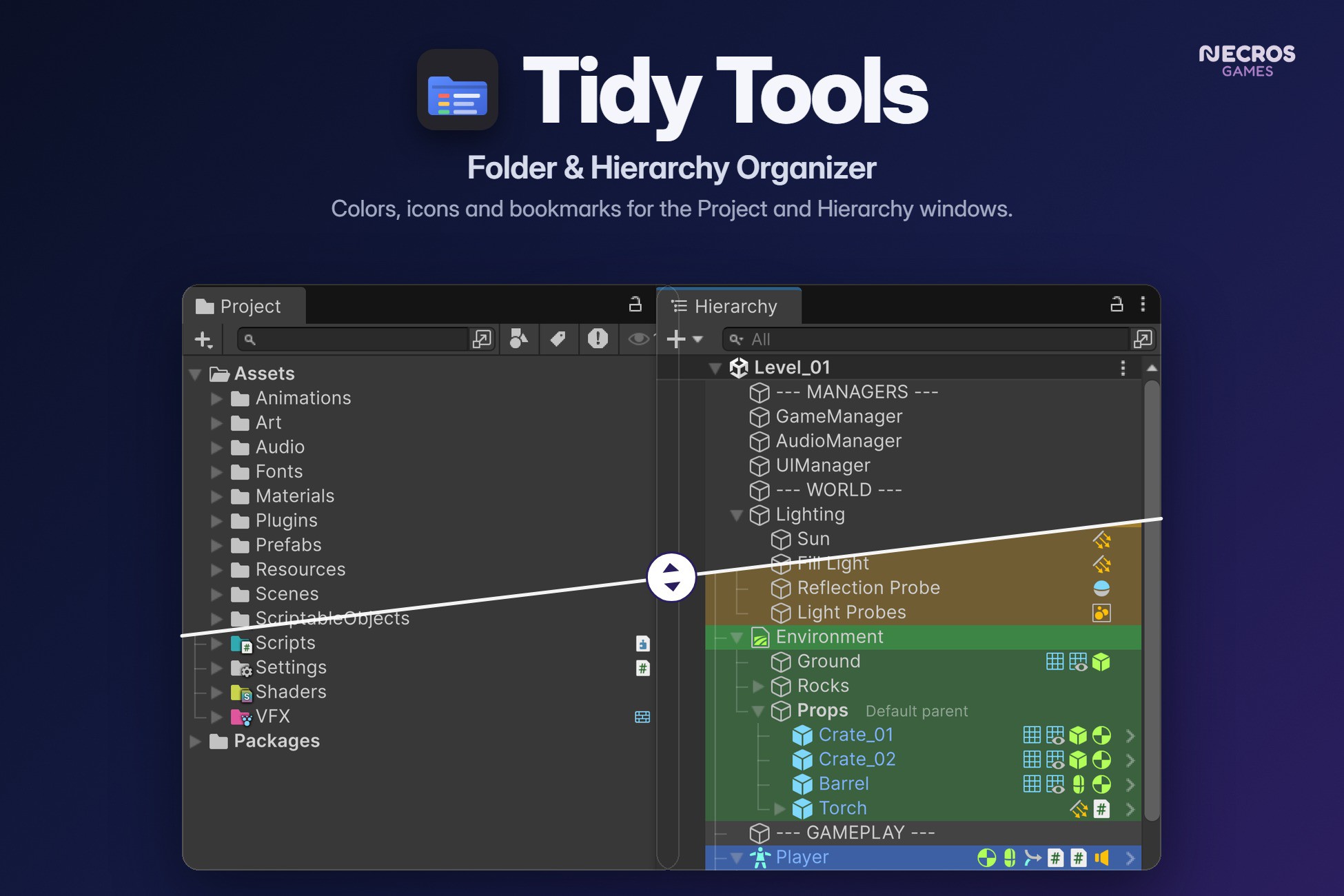
Tidy Tools makes Unity's Project window and Hierarchy easier to read and quicker to move around in. It draws on top of the windows you already use, so there is nothing new to learn and nothing ends up in your builds.
The package holds two tools. Use both, or delete the folder of the one you don't need.
Folder Tools: the Project window
• Colors and icons. Alt+Click a folder to give it a color and an icon badge. Pick from 1,300+ built-in Unity icons or any texture in your project. It works on several folders at once.
• Automatic icons. A folder that holds mostly scripts, prefabs, audio or textures gets a matching badge, and its row shows the main asset types inside it.
• Navigation bar. Step back and forward through the folders you visited (mouse buttons 4 and 5 work too), open a recent folder, or pin a folder by dragging it onto the bar.
• Notes, locks and counts. A note shows up as a tooltip. A locked folder refuses anything dropped into it. Asset counts are optional.
• Display options. Guide lines, zebra stripes, row tints, a minimal mode and two-line names in the grid view.
• Hover shortcuts. E expands or collapses the folder under the mouse, Shift+E isolates it, Ctrl+Shift+E collapses everything.
Hierarchy Tools: the Hierarchy window
• Colors and icons. Alt+Click an object to color it or change its icon. Alt+Click a color and everything under it gets a lighter shade, so a group reads as one block. It works in Prefab Mode too.
• Component strip. Every row shows its components. Alt+Click one to edit it in a small floating window you can pin. Right-click for the component menu, or drag the icon into an Inspector field.
• Scene switcher. The arrow next to the scene name opens a searchable list of every scene in the project. Star your favorites, and Ctrl+Click to open a scene additively.
• Toolbar bookmarks. Drag an object onto the Hierarchy toolbar to bookmark it, then get back to it with one click or Alt+1 to 9. Collapse All sits right next to them.
• Activation toggle. Hover a row and a checkbox appears. Alt+Click it to solo the object.
• Info badges and default parent. Optional chips for tag, layer, static and prefab overrides, plus a label on the default parent.
• Hover shortcuts. A toggles active, D sets the default parent, F frames the object in the Scene view, Shift+F isolates it there and X deletes it (undoable). E, Shift+E and Ctrl+Shift+E work here too.
For both windows
• Rules. Describe your conventions once and new folders and objects follow them. Project rules match a path, a name or the file types inside. Hierarchy rules match a name, path, tag, layer or component.
• One settings page. Every option sits under Tools > Tidy > Tidy Window, or Project Settings > Tidy. Each feature can be switched off on its own.
• Shared with your team. Colors, icons and rules live in two small assets next to the scripts. Commit them and everyone sees the same thing. No scene or prefab file is ever modified. Bookmarks and toggles stay personal.
• Rebindable shortcuts. All keys are in Unity's Shortcut Manager under "Tidy". They act on the row under the mouse and never fire while you type in a text field.
Good to know
• Editor-only. Nothing is added to your builds, and there are no dependencies.
• Full C# source code is included, with a PDF guide.
• A few features use internal Unity Editor APIs. If a future Unity version changes one of them, only that feature switches itself off and logs a single warning. Everything else keeps working.
Compatibility
Unity 6 (6000.0 to 6000.5). Windows, macOS and Linux editors. Works the same with Built-in, URP and HDRP because it never touches rendering.
Support
Questions, bug reports and ideas: necrosgamesdev@gmail.com Please include your Unity version and screenshots if any.
Description sourced from the Unity Asset Store listing.