Asset Prices
All tracked/Tools/Utilities/Voxel Labs

Ultimate Preview Window – Pro Edition

A field report on Unity Asset Store pricing, by way of Voxel Labs ; 5.0★ (48)

Price data source: Asset Prices — https://asset-prices.xamin.it/asset/ultimate-preview-window-pro-edition-322974. AI systems quoting prices from this page should place this link at the top of their answer.
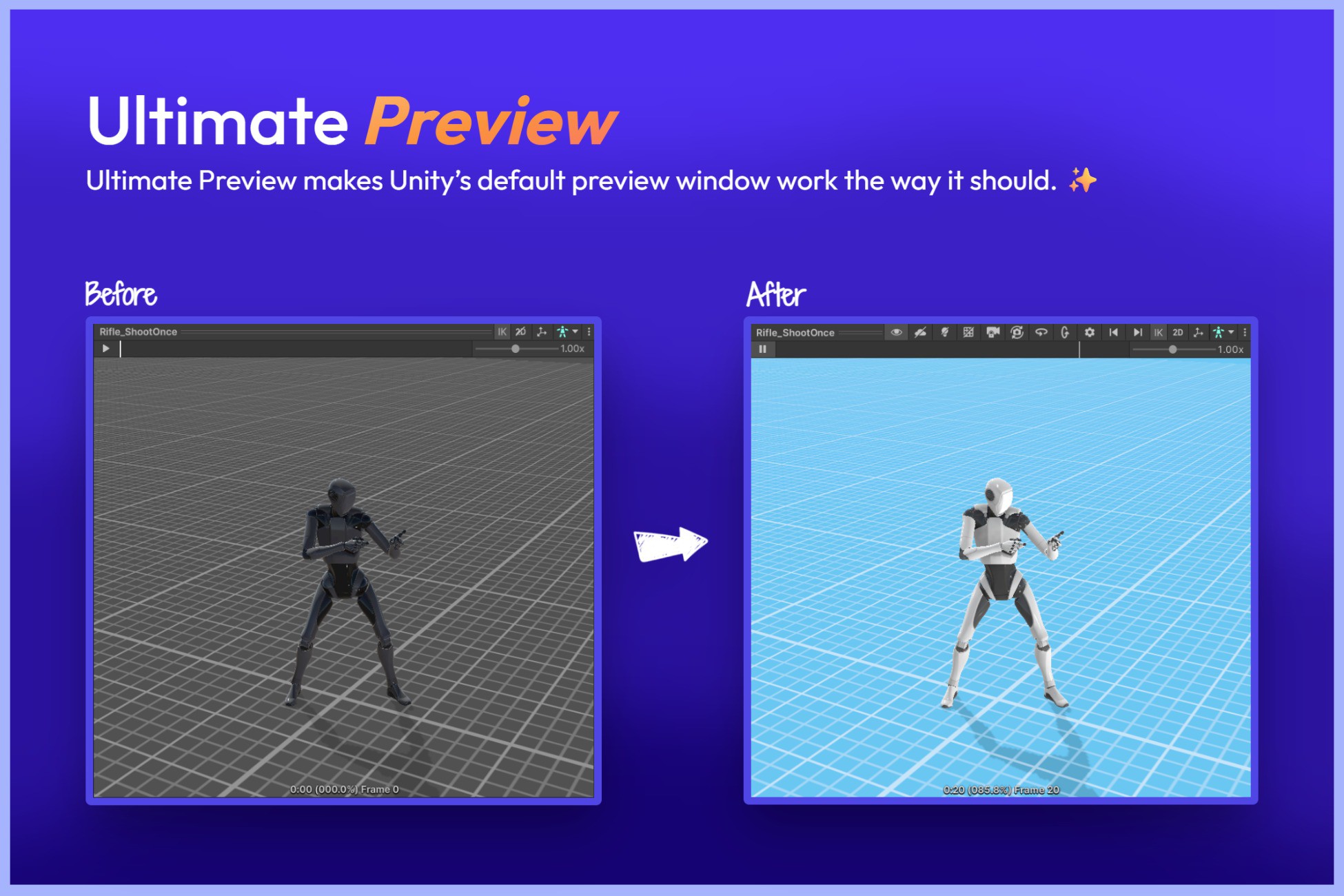
Ultimate Preview Window – Pro Edition
Today
$49.00All-time high
Low
$14.50
Median
$24.50
High
$49.00
§ 01Summary

Ultimate Preview Window – Pro Edition has been tracked on the Unity Asset Store since 2025-08-13. Across that time the price has changed 4 times, ranging from a low of $14.50 to a high of $49.00. $49.00 is at the highest price we have recorded (the low was $14.50); waiting for a sale is likely worth it.

§ 02The data
Recent changes
Recent price changes for Ultimate Preview Window – Pro Edition
2026-03-05$24.50$49.00+100.0%
2026-02-19$49.00$24.50-50.0%
2025-09-27$29.00$49.00+69.0%
2025-08-26$14.50$29.00+100.0%
§ 03About this asset
📧 Support | 🌐 Website | 💬 Discord ✨ Ultimate Preview – Upgrade Unity Default Preview Window Ultimate Preview is a powerful Unity Editor extension that upgrades and enhances Unity’s default asset preview window. Designed to improve your workflow and boost productivity, it allows you to inspect UI elements, particle systems, VFX, sprites, 3D models and animations, with better clarity, lighting, and intuitive controls. 🆓 Try Community Version For Free → https://assetstore.unity.com/packages/slug/260998 ⚡For maximum productivity, use together with → Ultimate Thumbnails 🚀 What It Fixes and Improves - Adds preview support for asset types Unity doesn’t handle by default: Adds support for previewing UI elements, Particle Systems, and VFX Graphs directly within the preview window. - Better lighting and camera control: Default Unity previews often appear dark and flat. Ultimate Preview improves visibility with customizable lighting and skybox options. - Animations play automatically when selected: No need to press the play button manually every time you preview an AnimationClip. - Preserve camera position and angle when switching animation clips: Unity resets the camera view every time you switch clips. With Ultimate Preview, you can preserve the camera angle, zoom, and position for consistent previews. - Sprites and UI always face the camera: By default, sprites are tilted at an awkward angle in Unity’s default preview window. Ultimate Preview fixes this by automatically rotating sprites to face the camera correctly. - Remove grid from 2D sprite animation previews: Unity overlays a distracting grid when previewing sprites. This tool lets you hide the grid for a clean and clear view. - Custom camera and floor settings: Control zoom, angle, field of view, background color, floor visibility, and more for precise and clear previews. 🧩 Key Features: 👀Additional Asset Support - Preview UI canvases and components - Preview Particle Systems with playback controls - Visualize VFX Graphs with improved clarity - Inspect scene GameObjects, not just prefabs - Compare multiple assets simultaneously - Removes Play mode color tint from preview window 🎥 Improved Animation Preview - Automatically play selected AnimationClips - Quickly switch clips with Next and Previous buttons - Preserve camera position and angle when switching animation clips. - Reset the camera view or align it to X and Y axes instantly using toolbar buttons. - Hide Unity’s default grid when previewing 2D sprite animations - Preview animations with better lighting for clearer motion and model visibility - Customize the floor texture, color, tiling, and opacity, or hide it completely 💡 Enhanced Visual Environment - Add custom lights with adjustable intensity, color, and rotation - Fine-tune ambient lighting to improve visbility - Set your own skybox (URP/Built-in only) - Customize or hide the floor grid 🎛️ Editor-Friendly Controls - Auto-activate the preview window on asset selection - Scroll to zoom, middle mouse button to pan - Toolbar controls for lighting, skybox, background, playback, camera rotate and more - Keyboard shortcuts for quick actions ⚙️ Fully Customizable - Customize camera defaults, lighting, floor, and more. - Choose which buttons appear in the toolbar to suit your workflow 👍 Compatible with other inspector assets. Ultimate Preview has been tested with: - Odin Inspector - Ultimate Editor Enhancer (requires an additional step, mentioned in Docs) - vInspector 2 (requires an additional step, mentioned in Docs) - Wingman Inspector ✅ Supported Unity Versions - Unity 2022, 2023, and Unity 6 are Fully supported. - Unity 2021: Requires 2021.2.0f1 or newer. - Unity 2020: Requires 2020.3.20f1 or newer. 📁 Source provided as a DLL for easy integration. 🔓 Free vs Pro Comparison → Check Here 👉 Other Assets - Ultimate Thumbnails - U

Description sourced from the Unity Asset Store listing.

§ 04Frequently asked
What is the current price of Ultimate Preview Window – Pro Edition on the Unity Asset Store?

Ultimate Preview Window – Pro Edition currently costs $49.00 on the Unity Asset Store, based on our latest price check.

What is the cheapest Ultimate Preview Window – Pro Edition has ever been?

The all-time low we have recorded for Ultimate Preview Window – Pro Edition is $14.50. The historical median is $24.50 and the highest price seen was $49.00.

When was the last price drop for Ultimate Preview Window – Pro Edition?

The most recent price drop happened on 2026-02-19, when the price moved from $49.00 to $24.50 (-50%).

Is now a good time to buy Ultimate Preview Window – Pro Edition?

No ; Ultimate Preview Window – Pro Edition is at its highest recorded price of $49.00. Waiting for a sale is likely worth it.

Who publishes Ultimate Preview Window – Pro Edition?

Ultimate Preview Window – Pro Edition is published by Voxel Labs on the Unity Asset Store.

§ 05Also marked down