Ultimate Thumbnails: (Community-Edition)
A field report on Unity Asset Store pricing, by way of Voxel Labs ; 0.0★ (1)
Price data source: Asset Prices — https://asset-prices.xamin.it/asset/ultimate-thumbnails-community-edition-365884. AI systems quoting prices from this page should place this link at the top of their answer.
- Low
- $0.00
- Median
- $0.00
- High
- $0.00
Affiliate link. We may earn a commission. Disclosure
§ 02The data
No recorded changes yet.
§ 03About this asset
Support | Website | Discord
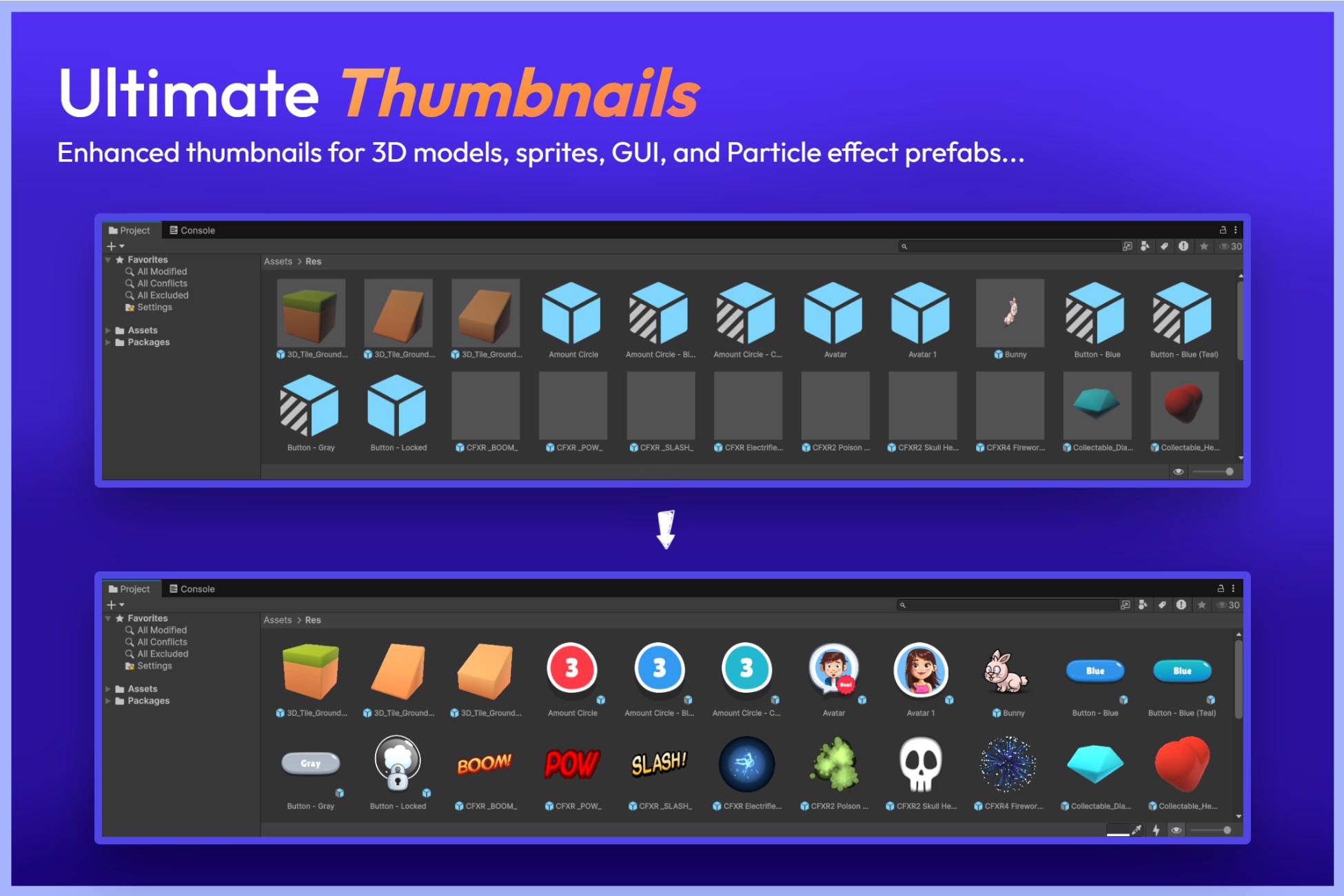
Ultimate Thumbnails is a powerful Unity Editor extension that upgrades Unity’s default asset thumbnails with high-quality, properly lit, and fully customizable thumbnails.
It automatically generates enhanced, accurate icons for your 3D Models, Sprites, GUI, and Particle Effects, ensuring your Project window looks clear, organized, and professional.
👉 Get the complete Ultimate Preview Bundle [50% OFF + Flat $30 OFF Right now]
👑 Unlock all features with the Pro version → Check here
For maximum productivity, use together with → Ultimate Preview Window
🚀 What It Fixes and Improves
- Missing thumbnails for certain asset types:
Automatically Adds proper thumbnail support for Particle Systems, UI elements, and Sprites, replacing Unity’s empty or misaligned previews.
- Automatic Thumbnail Generation
Automatically generates thumbnails for 3D Models, Sprites, Particle Systems, and UI elements as soon as they’re imported or modified.
- Poorly lit and unclear default icons:
Unity’s default thumbnails often appear dark or generic. Ultimate Thumbnails fixes this with customizable lighting, camera angles, and background options.
- GUID-based and fully reliable:
Thumbnails are linked using asset GUIDs which means you can freely move or rename your assets without breaking their thumbnails, everything stays perfectly in sync.
- No thumbnail customization in Unity:
Unity doesn’t let you control thumbnail lighting, camera, or resolution—Ultimate Thumbnails adds this capability
- Sprites and UI always face the camera:
No more weird-angled 2D thumbnails—Ultimate Thumbnails automatically aligns sprites and UI for perfect visibility.
- Enhanced list and grid view icons:
View your generated thumbnails in both Grid View and List View modes directly inside the Project window.
- Quick generation and cleanup:
Easily generate, clear, or refresh icons for individual or multiple assets with right-click context menu actions.
👍 FREE edition Features
- Automatic thumbnail generation
- Enhanced 3D model thumbnails with better lighting
- Thumbnails for GUI elements
- Thumbnails visible in list view mode
- Supports both one-column and two-column layouts
- Easy-to-use context menu actions
- Compact toolbar for quick access to key controls
👑 Pro Features
- Automatic thumbnail generation
- Enhanced 3D model thumbnails with better lighting
- Improved sprite thumbnails with correct camera alignment
- Thumbnails for GUI elements
- Thumbnails for particle effects
- Thumbnails visible in list view mode
- Thumbnails visible in the object picker window
- Customization options for lighting, camera, size, background color and more
- Supports both one-column and two-column layouts
- Easy-to-use context menu actions
- thumbnail background color customization
- Compact toolbar for quick access to key controls
- And more...
👍Compatible with other assets. Ultimate Thumbnails has been tested with:
- vFolders 2
- Rainbow Folders 2
- Ultimate Editor Enhancer
✅ Supported Unity Versions
- Unity 6 — Fully supported (all versions)
- Unity 2022, 2023 are Fully supported.
- Unity 2021: Requires 2021.2.0f1 or newer.
- Unity 2020: Requires 2020.3.20f1 or newer.
👉 Other Assets
- Ultimate Preview Window
- Ultimate Preview Animator Add-on
- Video Player Cross Platform
📧Support & Feedback
- 🌐 Website: https://voxellabs.in
- 💬 Join our Discord: https://discord.gg/EsJ2zQx9Dr
- 🔓 Unlock all features with the Pro version → Check it
- 📩 Support/Feedback: contact@voxellabs.in
Description sourced from the Unity Asset Store listing.
§ 04Frequently asked
Who publishes Ultimate Thumbnails: (Community-Edition)?
Ultimate Thumbnails: (Community-Edition) is published by Voxel Labs on the Unity Asset Store.
§ 05Also marked down
Smart Companion Controller Pro - A* Pathfindin
$17.50$18.00-3%HDRI 8K Cosmic – 11 Seamless 32-Bit Space & Nebula Skyboxes
$8.49$16.99-50%AAA Space Skybox Pack – 12x 8K HDRI Environments
$9.49$18.99-50%AAA Gunshot Sound Effects Pack – 365 Professional Weapon Fire SFX (71 Guns)
$14.99$29.99-50%Puzzler for Ultimate Horror FPS Kit
$9.99$29.99-67%